
The free trial, plans, and life without a subscription
Checked against the app on 24 October 2026
Olive Grove starts with a 30-day free trial with everything on, and no card is needed. Then it is one subscription, paid monthly or yearly, with everything included on two computers. Without a subscription, Olive Grove becomes a read-only archive: you can still open, read, search, print and export every record.
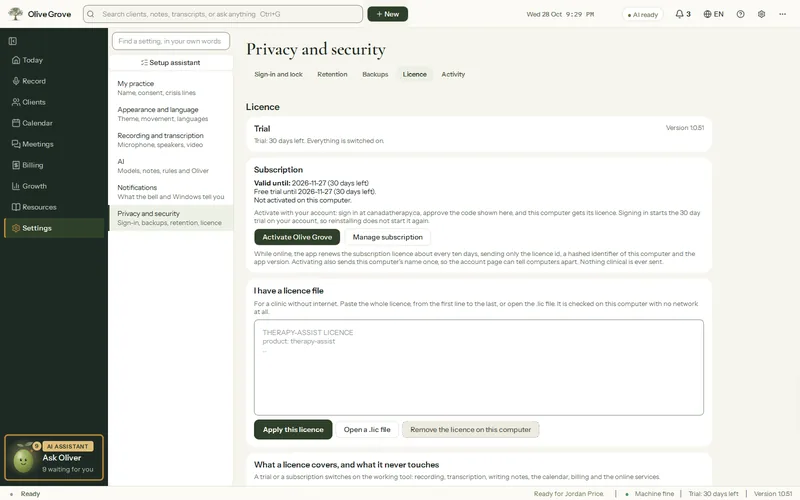
Where: app.olivegrove.app > Your plan
Step 1: Activate your first computer: the trial starts. The account page shows when it ends, and the app’s footer counts the days left.
Step 2: Before it ends, open your account and press Subscribe. Choose monthly or yearly and pay on Stripe’s secure page. A promotion code, if you have one, is shown with the price it gives.
Step 3: The app picks up the subscription by itself the next time its licence renews, or at once with Settings > Licence > Check now.
Without a subscription
Olive Grove becomes a read-only archive. You can still open, read, search, print and export every record, and restore backups, always. Your records are never held back. Recording, transcription, writing notes, the calendar, billing and the online services wait for a subscription. If the licence cannot be checked, the app falls back to read-only, never to locked out. Cloud backups and online records (bookings, pay links, payments, fees) are kept 12 months after a subscription ends, with emails 60, 30 and 7 days before deletion, and you can download them from your account page without a subscription.
Was this article helpful?
Related articles
Still need help?
Write to us. We read every message and reply within one business day.