
Olive Grove guide
Private AI for therapy notes: what “local” means, and what to ask any AI scribe
Updated 23 October 2026
Most AI note tools send the session’s audio or transcript to a company’s servers, where the speech recognition and the language model run. A local tool runs both on your own computer, so the recording and the transcript never have to leave it. Either can be used with care. What matters is that you know exactly what leaves your computer, who can read it, whether it is kept or used for training, and that your client has agreed to it.
How an AI scribe works
Every AI note tool does three things: it records the session, transcribes the speech into text, and has a language model turn the transcript into a note. The privacy question is where each step happens.
| Aspect | Cloud AI scribe | Local AI scribe |
|---|---|---|
| Speech recognition | On the company’s servers | On your computer |
| Note writing | A model on the company’s or a partner’s servers | A model on your computer |
| Where audio and transcripts are kept | Their servers, for as long as their policy says | Your disk, until you delete them |
| Works without internet | No | Yes, once set up |
| What you need | Any device and a connection | A capable computer and disk space for the models |
Ten questions to ask any AI note tool
- Where does the audio go? Is it processed on my computer or uploaded? If uploaded, to which company, and in which country?
- Which model writes the note, and who runs it? Is a third-party AI provider involved?
- Is anything kept after the note is written? Audio, transcripts, notes: for how long, and can I delete them?
- Is my clients’ information used to train or improve a model? Ask for the answer in writing.
- Who at the company can read it? Support staff, reviewers, subcontractors?
- What is sent besides the session? Analytics, crash reports and usage data can carry more than you expect.
- How are records protected on my computer? Encryption at rest, sign-in, and what happens if the laptop is lost.
- Are AI drafts labelled, and can I see where each sentence came from? A draft you cannot check against the session is a risk.
- What happens to my records if I stop paying? Can I still read and export everything?
- What does the client agree to? Is there a plain-language consent form that says what is recorded and where it goes?
The rules on health information differ from place to place. Check what applies where you practise, and what your professional body expects about recording and AI.
The trade-offs of local AI
- It needs the right computer. Models take memory and disk space; a graphics card makes them faster but is not always required.
- Notes can take longer on a modest machine than on a large server.
- Security is partly yours. Records live on your disk, so disk encryption, sign-in and backups matter.
- In return, there is no AI provider holding your sessions, it keeps working without internet, and you can say to a client exactly where their recording is.
How Olive Grove answers them
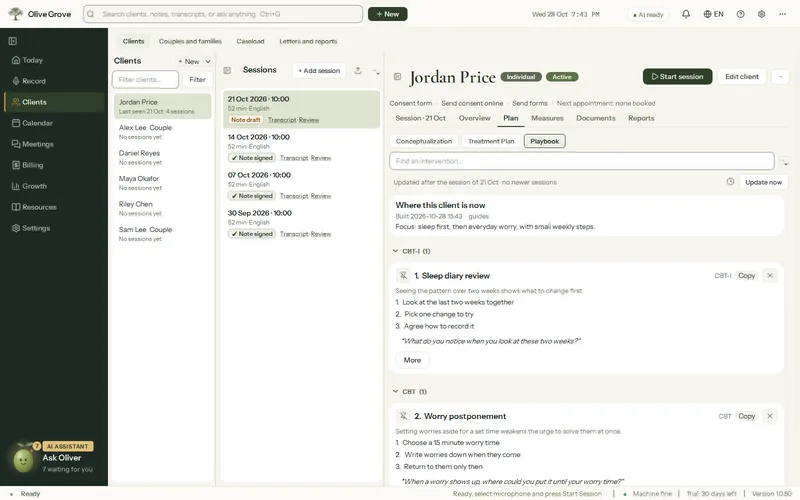
Olive Grove is a local AI assistant for therapists on Windows. Its answers to the questions above:
- Speech recognition and the AI that writes notes run on your computer; recordings, transcripts and notes are kept on its disk. There is no online AI provider.
- No telemetry: no analytics and no crash reports are sent. The app checks its licence and asks whether there is an update; the product page lists exactly what each check carries.
- Cloud backup is optional and off until you turn it on. The backup is encrypted on your computer with a recovery code only you hold, and we cannot open it.
- The app does not yet encrypt its own files. It checks whether Windows disk encryption is on, warns before recording when it is not, and sets up sign-in with Windows Hello.
- Every draft is marked as an AI draft, a second pass flags risk the note missed and statements the transcript does not support, and each sentence links to the transcript lines it came from.
- Without a subscription, Olive Grove becomes a read-only archive: you can still open, read, search, print and export every record, and restore backups. Recording, writing notes and the online services wait for a subscription.
- It includes a plain-language client consent form, and records consent with the date in the client’s file.
Read how it drafts each format in DAP, SOAP, BIRP and GIRP notes, and exactly what the app keeps and sends on Privacy.
Common questions
More guides
- DAP, SOAP, BIRP and GIRP notes: the formats, with examples
What each progress note format means, when to use it, and a short example of each: DAP, SOAP, BIRP and GIRP, plus intake and couples notes, for therapists and counsellors.
- Consent to record therapy sessions: what to explain, how to ask, how to keep the answer
How to ask a client for informed consent to record a therapy session: what to explain, how to ask, how to note the answer, and what to do when consent is withdrawn.
- Measurement-based care with the PHQ-9 and GAD-7: what they measure, how often, and how to read change
Measurement-based care with the PHQ-9 and GAD-7: what each measures, the score bands from the original papers, how often to give them, and how to read change over time.
- Documenting couples and family sessions: whose record, what goes where, and privacy between partners
How to document couples and family therapy: whose record it is, what goes in a joint note and what stays in an individual file, and privacy between partners.
- Writing a treatment plan with measurable goals: goals, objectives, interventions and review dates
How to write a therapy treatment plan with measurable goals: goals in the client’s words, objectives you can check, the interventions that serve them, and review dates, with an example.
- Keeping client records safe on your own computer: sign-in, encryption, backups and lost devices
Good practice for therapists who keep client records on their own computer: sign-in and screen lock, disk encryption, backups including off-site, and what to do if a device is lost or stolen.
- Using AI for clinical documentation responsibly: a checklist for therapists
A checklist for therapists using AI to draft clinical notes: client consent, where the data goes, reviewing every line, bias, and why the clinician signs.