A checklist

    How to compare AI note tools

    Ten questions a careful clinician can ask of any AI documentation tool before recording a client. Ask each tool you consider the same questions; Olive Grove’s answers are below, from the facts on this site.

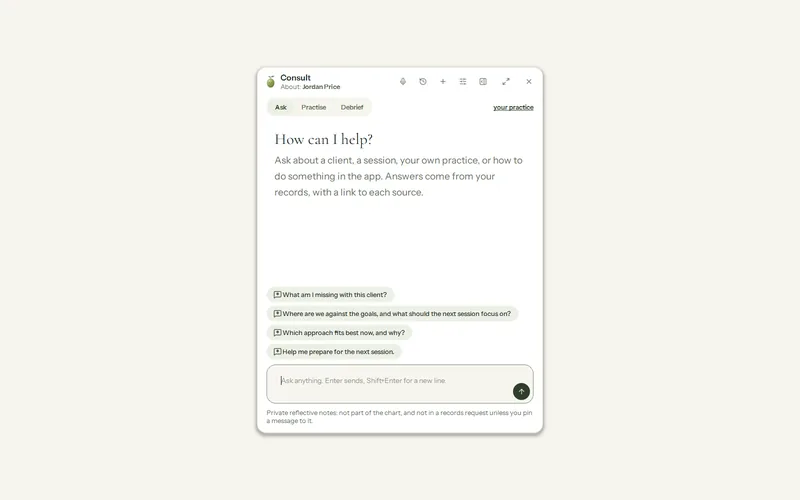
    Consult, ready for a question: Ask, Practise and Debrief, suggested questions such as preparing for today, and a box to ask anything about a client, a session or the practice.

    Olive Grove’s answers

    Where does the recording go?

    Why ask: A session recording is the most sensitive thing a documentation tool handles. Ask where it is processed, where it is kept, and for how long.

    Olive Grove

    Recordings, audio and video, are kept on the computer you install Olive Grove on, and the speech recognition runs there too.

    Audio and video can be deleted automatically a set number of days after the note is signed (30 days on a new installation); the transcript and note are kept.

    Where the data goes

    Where does the AI run?

    Why ask: Writing a note takes a language model. Ask whether it runs on your own computer or on a server, and whose.

    Olive Grove

    The speech recognition and the AI that writes the notes run on the computer itself. There is no online AI provider.

    The notes model is chosen by memory: under 8 GB gets the smallest (Qwen 3.5 2B, which may be slow), 8 GB up to under 20 GB gets Qwen 3.5 4B, and 20 GB or more gets Qwen 3.5 9B. A graphics card is not required; an NVIDIA card makes transcription and notes faster.

    Specifications

    What is sent over the internet, and to whom?

    Why ask: Besides the session itself, analytics, crash reports and usage data can carry more than you expect. Ask for the full list.

    Olive Grove

    Olive Grove does its work on your computer: recording, transcription and note drafting run there, with its AI. Backups and other content you choose to keep online, such as form answers, are locked on your computer before they are sent, with a key only you hold, so we cannot read them. Online features such as booking, reminders and payments use only the information they need to work, as listed on Your data.

    The update check sends only the app’s version number; the licence check sends the licence id, a scrambled identifier of the computer and the version. The AI and speech models are downloaded once; nothing clinical is uploaded.

    The online features (booking, reminders, client forms, online payments, cloud backup and the others) are off until you turn them on, and each is listed with exactly what it sends and where.

    Everything the app sends

    Who can read the records?

    Why ask: Ask who can open the records: staff, reviewers or subcontractors of the company, and anyone who picks up your computer.

    Olive Grove

    The records are on your computer, behind the app’s sign-in (Windows Hello or your Windows password, or a password or PIN of the app’s own), and the screen locks after 15 minutes without activity. The activity log records sign-ins, locks, files opened, notes signed and amended, exports and deletions.

    The app does not yet encrypt its own files: it checks whether Windows disk encryption protects the drive and warns before recording on an unencrypted disk. The optional cloud backup is sealed on your computer with a recovery code only you hold, and the service cannot open it; client form answers and secure messages are sealed so the service cannot read them either.

    Security

    What happens to the records when you stop paying?

    Why ask: Records you are responsible for must stay readable. Ask what you can still open, export and restore once a subscription ends.

    Olive Grove

    Olive Grove becomes a read-only archive. You can still open, read, search, print and export every record, and restore backups, and your records are never held back. If the licence cannot be checked, the app falls back to read-only, never to locked out.

    Cloud backups and online records (bookings, pay links, payments, fees) are kept 12 months after a subscription ends, with emails 60, 30 and 7 days before they are deleted.

    Life without a subscription

    Does it work without internet?

    Why ask: Connections drop, and some rooms have none. Ask what still works offline, and for how long.

    Olive Grove

    The speech recognition and the AI run on the computer once their models are downloaded, so a session is transcribed and its note drafted there. The licence on each computer lasts 35 days and renews itself while online, so a week or two without internet is fine; a warning appears in the last 7 days. A clinic without internet can use a signed licence file instead.

    The online features you turn on, such as online booking, reminders to clients and the video room, need a connection to reach your clients.

    Questions

    Who has the last word on a note?

    Why ask: An AI draft is written by something that was not in the room. Ask whether drafts are labelled, and whether you can check each sentence against the session.

    Olive Grove

    You do. Every note is marked as an AI draft for you to read, correct and sign, and nothing is signed without you. Put the cursor in a sentence of the note and the transcript lines it most likely came from appear beside it, with times and a Play button.

    Live cues are prompts for you to put in your own words, or to ignore. Risk watch and the safety check point at what may need a look; what to do about it stays with you.

    Notes after the session

    Can you take everything with you?

    Why ask: You may change tools one day. Ask how the records come out, in what form, and whether they can come in from the tool you use now.

    Olive Grove

    Export the whole practice puts every chart and the books into a dated folder you choose: a PDF of each client’s full record, spreadsheets of clients, sessions, appointments, invoices, payments and measures, and a README. Recordings and a password seal are optional.

    Coming in, a client list or upcoming appointments can be brought from another system as a spreadsheet, and a recording made elsewhere is written up like a recorded session.

    Move from another system

    How is it priced?

    Why ask: Ask what is included, whether features or notes cost extra, how many computers a plan covers, and how to cancel.

    Olive Grove

    One subscription, paid monthly or yearly, with everything included on two computers. There are no add-ons and no per-note charges. Payments are handled by Stripe, and you can cancel any time from your account.

    Olive Grove is by invitation for now, opened to a small number of clinicians at a time.

    Pricing

    The rules on health information and on recording differ from place to place. Check what applies where you practise, and what your professional body expects.

    Ask us anything on this list

    Join the waiting list to try Olive Grove when a place opens, or write to support with a question.