
 Get started
Get started with Olive Grove
Olive Grove is by invitation for now. Join the waiting list, and when a place opens for you, download it from your account page and let the setup prepare your computer.
Windows 10 or 11, 64-bit; a Mac version is in development.
How to get it
- Join the waiting list with your name and email. You get a confirmation straight away.
- We are opening Olive Grove to a small number of clinicians at a time. When a place opens for you, we email you.
- Then you download it from your account page, install it, and activate it in the app.
Join the waiting list
Olive Grove is invitation only for now. Leave your name and email and you get a confirmation straight away. When a place opens for you, we will email you with how to get started.
Why it exists
A clinician finishes a session knowing something went sideways. Supervision is where that gets named, and it works, but most clinicians get it fortnightly at best. The gap is rarely knowledge. It is frequency.
Olive Grove was built alongside a clinical supervision practice, to give that kind of feedback a place in the days between supervision hours.
Install it
What it needs
- Windows 10 or 11, 64-bit
- Mac: in development, built for Apple silicon
- 8 GB of memory or more; it runs on less with a smaller notes model, which may be slow
- Room on the disk for the AI models; the setup checks before it downloads them
- An NVIDIA graphics card makes transcription and notes much faster, but is not required
- A microphone; for online sessions it records the call audio as well
Download it when your place opens
Join the waiting list. When a place opens for you, we email you, and the download is on your account page with its version and size.
Run it
Windows may show “Windows protected your PC” because the installer is new and not yet widely downloaded. Choose More info, then Run anyway. Your account page shows the file’s checksum if you want to check it first.
Let the setup finish the job
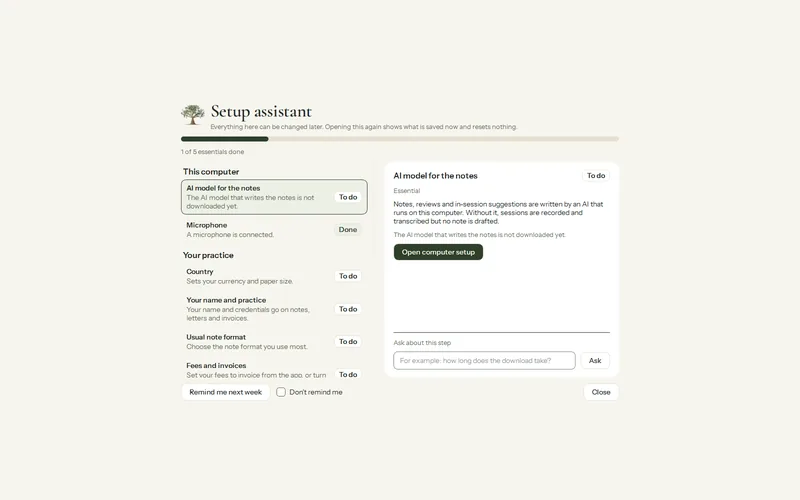
On first launch it reads the computer’s memory and graphics card, lists what it needs with the sizes, and downloads the speech and writing models once you press the button. From then on they run on the computer itself.
Check the download
Once your place opens, your account page shows the current version, its size and its SHA-256 checksum next to the Download button, with the one PowerShell command that checks the file before you run it.
Specifications
What it runs on, which AI model your computer gets, the languages, formats and measures, and how licensing and updates work.
Windows, and Mac to come
Windows 10 or 11, 64-bit only. The installer asks for administrator rights to install for everyone on the computer, or installs for you alone if that is declined. Records are kept in your Windows profile and are not removed by an uninstall.
The AI models are downloaded after installation, not shipped in the installer. Set up this computer lists every download and its size first, and warns when free space is less than the downloads plus 5 GB.
Mac. Olive Grove for Mac is in development, built for Apple silicon. Join the waiting list and we will tell you as soon as it is ready.
Which notes model your computer gets
The choice depends on the memory Windows reports, not on the graphics card.
| Memory | Notes model | Download |
|---|---|---|
| Under 8 GB | Qwen 3.5 2B, with a warning that notes may be slow or fail | 1.3 GB |
| 8 GB to under 20 GB | Qwen 3.5 4B | 2.7 GB |
| 20 GB or more | Qwen 3.5 9B | 5.7 GB |
The Model library also offers Granite 4.2 3B and Ministral 3 3B, and Ling 3.0 Tiny where the engine supports it. Any of them can be chosen; a model you choose is never replaced automatically.
Graphics card
| Computer | AI engine | Speech recognition |
|---|---|---|
| NVIDIA card | Graphics card (CUDA) engine, about 1.2 GB download | Whisper large-v3-turbo live, large-v3 after the session when the card has about 4.5 GB free; needs the 1.2 GB graphics card pack |
| AMD Radeon or Intel Arc card | Graphics card (Vulkan) engine, about 32 MB | Whisper “small” on the processor |
| No dedicated card | Processor engine, included | Whisper “small” on the processor |
A graphics card is not required. Speech models are never downloaded during a session.
The practice client speaks English with standard voices that run on the processor on every computer (218 MB). The natural voices, which can sigh, hesitate and cry, need an NVIDIA graphics card with 6 GB or more (about 814 MB); other computers use the standard voices automatically. They load only while you practise and never run during a recorded session.
Languages
Interface, 11: English, Français, Español, Português, Deutsch, Italiano, 中文, हिन्दी, العربية, فارسی, Türkçe. Arabic and Persian are laid out right to left.
Transcription, about 100 languages, plus Auto-detect. Each can be kept as spoken or translated to English as it is transcribed. The list also has “English and French (switches)”, and Auto-detect switches language when the speakers do.
Notes, reviews, live suggestions and Ask answers can each be written in English, in the session’s language, or in any transcription language. Note section headings stay in English. Risk watch phrases are in English, French and Arabic.
Notes and sessions
Note formats: DAP (default), Comprehensive Intake / Biopsychosocial, Couples / Relational, SOAP, BIRP, GIRP. Automatic picks Couples / Relational when two or more people are in the room. A note can be rewritten in another format before it is signed.
Sessions: individual or joint, recorded; or added from your notes, brought in from past notes, imported from a recording, or logged as a no-show or late cancellation. Appointment types: therapy session, assessment, consultation.
Clients: individual (adult), child or adolescent, couple, family; caseload statuses intake, active, on hold, discharged.
Measures and questionnaires
13 instruments, scored with severity as you go:
PHQ-9, GAD-7, PHQ-2, PCL-5, ISI, AUDIT-C, MDQ, ASRS (Part A), C-SSRS (ideation screen), RSES, CSI-4, HITS, Session Check.
PHQ-9 item 9 and the C-SSRS raise safety flags. The Session Check is an in-house alliance check, not a validated instrument.
Session guides, approaches and techniques
Session guides for individual, couples (EFT and Gottman) and family work, and one for every session, with scripts for consent to record, confidentiality, the couples secrets policy, family work, child protection and disclosed violence.
33 approaches and 5 stances, 46 techniques in 10 groups, 7 kinds of report and letter, and 30 fictional practice cases.
Files in and out
| In | Formats |
|---|---|
| Recordings | mp3, m4a, wav, aac, ogg, flac, mp4, mov, m4v, webm, mkv |
| Past notes | Word (.docx), PDF, text, Markdown, or pasted text |
| Client documents | PDF, DOCX, TXT, MD, CSV (scanned PDFs and .doc give no text) |
| Calendar | A private iCal (.ics) address |
| Logo | PNG, JPG, BMP, WEBP |
| Out | Formats |
|---|---|
| Notes, transcripts, records, reports, letters | PDF (US Letter) or Word (.docx) |
| Invoices, receipts, statements | PDF (Letter or A4) |
| Accountant export | CSV |
| Privacy pack | Word (.docx) |
| Recordings | WAV audio, MP4 video |
Licence and updates
30 days with everything on. Then one subscription, activated by approving a code at canadatherapy.ca, for two computers at a time. A signed licence file is available for a clinic without internet.
The licence on the computer lasts 35 days and renews itself while online. Without a licence, or if it cannot be checked, Olive Grove becomes a read-only archive: you can still open, read, search, print and export every record.
Updates are checked a minute after the app opens and every few hours while it is open, installed when you choose (Update now, or when you close the app) after the SHA-256 checksum is verified, and never during a recording.
Support
Your subscription and computers are managed from your Olive Grove account. For help, write to admin@canadatherapy.ca. In the app, Help, Open log folder gives you the logs to send; they record what the app did, not what clients said.