
Forms clients fill in before the first session
Checked against the app on 24 October 2026
Clients fill in your intake questions, sign your consent form and answer the PHQ-9 or GAD-7 online before their first session, from a link in an email. Their answers are sealed on their device for your computer only, and land in their file.
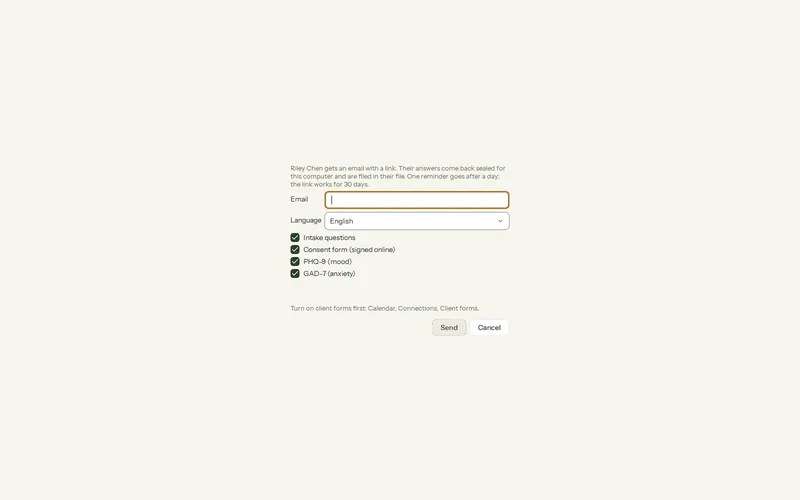
Where: Calendar > Connections > Client forms; a client > Send forms…
Turn client forms on
Step 1: Open Calendar > Connections > Client forms and tick Send client forms.
Step 2: Under Form, tick the forms you use: Intake questions, Consent form (signed online), PHQ-9 (mood) and GAD-7 (anxiety).
Step 3: To send them with online bookings, tick the forms in the With online bookings column and choose who gets them under Online bookings send them to: new clients, everyone who books, or nobody (you send them yourself).
The consent form is your own, from Settings > My practice > Consent form, with your practice and name filled in. See The consent form and the care record.
Send forms to one client
Step 1: Open the client and choose Send forms….
Step 2: Check the email address and choose the language, English or French.
Step 3: Untick any form they do not need, and press Send. The link is also copied to your clipboard, in case you would rather send it yourself.
What the client sees
- One form at a time, on app.olivegrove.app, on a phone or a computer. The intake asks about contact details, an emergency contact, what brings them, goals, past therapy and health; anything not required can be left blank.
- The consent is signed by typing their full name. Drawing a signature is optional, so nobody who cannot draw is stopped.
- Questionnaires show a reminder that answers are read before the session, not right away, and what to do in an emergency.
When the answers come back
- Olive Grove checks every few minutes while it is open (or press Check now) and files the answers in the client’s file: the intake as a document, the consent as a signed record, and each questionnaire as a scored measure.
- The client is matched by email address, then by name; a new client is created when there is no match. Date of birth, pronouns, phone and address fill empty fields in their file.
- Flags, such as any answer other than “Not at all” to PHQ-9 item 9, are listed under Answers that need your attention. Press I have seen these once you have dealt with them.
- Waiting for the client lists links not yet answered. Cancel the link stops one.
Limits
- Needs internet and a subscription, and is off until you turn it on.
- The PHQ-9 and GAD-7 are in English only. Intake and consent come in English and French.
- A link works for 30 days, with one reminder after a day.
- The service holds only the sealed answers, which it cannot read, and deletes them once they are filed on your computer.
- A new computer cannot open answers sealed for the old one. After moving, send those forms again.
Was this article helpful?
Related articles
Still need help?
Write to us. We read every message and reply within one business day.