
 Features: 11 in this area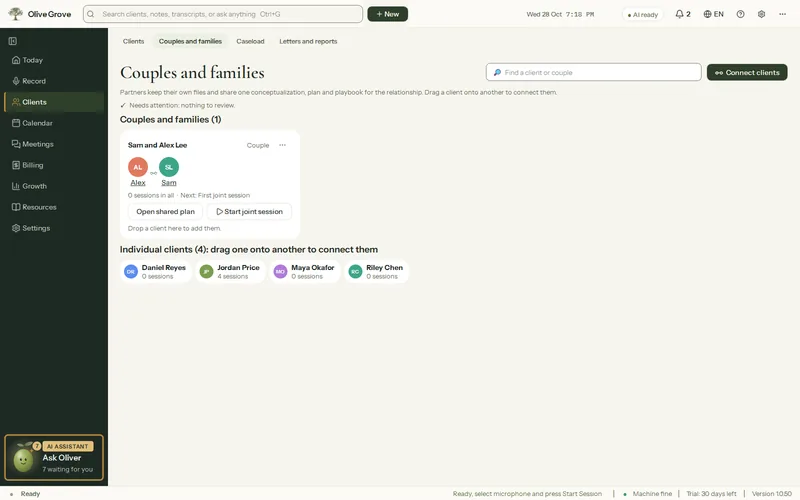
Couples and families
Joint sessions in every member’s chart, with a shared formulation and plan.
- Connect a couple or family. Drag one client onto another.
- Who is in the room. Tick who came. It decides the note format and which charts the session goes into.
- One shared note. A joint session appears in every member’s chart; edit or sign it once.
- Shared formulation and plan. For the relationship, with an individual formulation kept for each person.
- Who is speaking. After the session, voices it recognises for sure are named by themselves. The few it is unsure of wait for you, with a best guess already chosen.
- Couples measures. The CSI-4 and the HITS, given to each partner separately.
All 11 features in this part
- Couples and families page
- Every couple and family as a card, every unconnected client as a chip, and a panel of likely couples and possible duplicates to review.
- Connect a couple or family
- Drag one client onto another, or onto a group's card, to connect them as a couple or a family. Right-click "Connect with…" does it without dragging.
- Who is in the room
- For a client in a couple or family, tick who is actually present. This decides individual or joint session, the note format and which charts the session goes into.
- Joint sessions in every chart
- A joint session appears in every member's chart with one shared note, marked "Shared with <names>"; editing or signing it applies to all.
- Shared formulation and plan
- A connected couple or family has a relationship formulation, plan and playbook shared by every member, and each person keeps an individual formulation of their own.
- Manage or separate a group
- Rename a group, set each member's role, add or remove members, or separate a couple, keeping joint sessions in both files and copying the shared formulation and goals to each.
- Compare and merge duplicates
- Files that look like one person entered twice are listed, shown side by side, and merged into the one you keep. A couple's shared file can also be merged into the partners' own files.
- Start a joint session
- Start recording a session for a couple or family straight from its card, with every member ticked as present.
- Who is speaking, after the session
- After the accurate transcript, voices recognised for sure are named by themselves (logged in Activity, with Undo), and a voice split off from the client or you is folded back. Only voices still uncertain wait in the bell, with a best guess already chosen.
- Voice signatures
- Each person's voice is kept as a voice signature, 192 numbers from a speaker-recognition model (not audio), learned and refined from their sessions, so sessions name who is speaking by themselves; in an individual session the other voice is that client by default.
- Couples measures
- The Couples Satisfaction Index (CSI-4) and the HITS partner violence screen, each given to each partner separately, and suggested for joint sessions.