
Note formats: DAP, SOAP, BIRP, GIRP, intake and couples
Checked against the app on 24 October 2026
Olive Grove drafts DAP (the default), SOAP, BIRP, GIRP, Comprehensive Intake / Biopsychosocial and Couples / Relational notes. Choose before the session, or rewrite the note in another format before you sign it.
Where: Record > Note; or a session > Regenerate note
| Format | Sections | Often used for |
|---|---|---|
| DAP | Data, Assessment, Plan | Most individual sessions |
| SOAP | Subjective, Objective, Assessment, Plan | Settings that share notes with medical teams |
| BIRP | Behaviour, Intervention, Response, Plan | Showing what you did and how the client responded |
| GIRP | Goals, Intervention, Response, Plan | Work tied closely to treatment goals |
| Intake | Comprehensive Intake / Biopsychosocial | A first session or assessment |
| Couples | Couples / Relational | Joint sessions with a couple or family |
Step 1: Before the session, choose the format beside Note on Record, or leave Automatic.
Step 2: Automatic picks Couples / Relational when two or more people are in the room or the client is a couple or family, and otherwise your usual format.
Step 3: To change it afterwards, open the session and press Regenerate note (Ctrl+Shift+G), then choose the format. The earlier text is kept under Versions.
Your own note formats
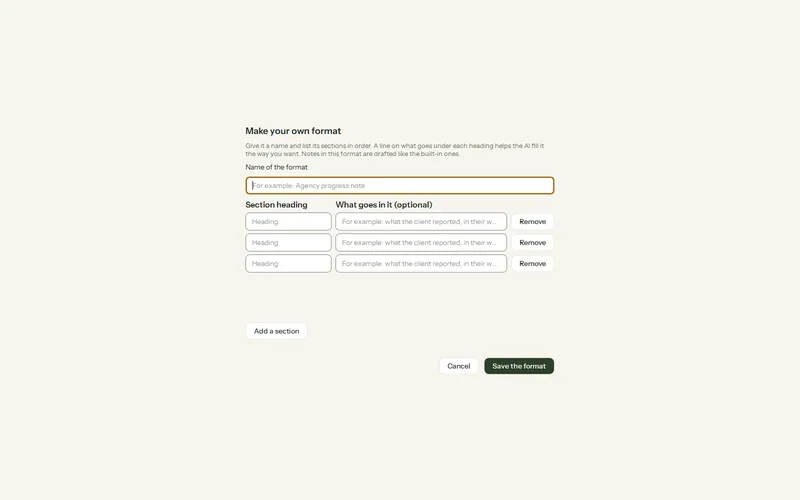
Step 1: Open Settings > AI > AI rules and, under Your note formats, press Make your own format….
Step 2: Give it a Name of the format, then for each section a Section heading and, if you like, What goes in it (optional). Add a section adds another (up to 12).
Step 3: Press Save the format. It appears wherever you choose a format and is drafted the same way as the built-in ones.
- Change… edits it; notes already written keep their text. Delete removes it; those notes keep their text too.
- Export… saves it as a small file and Import… adds one, to share a format with a colleague or another computer.
- A list already open (such as the format beside Note on Record) shows a new format after Olive Grove is restarted.
Our guide DAP, SOAP, BIRP and GIRP notes explains each format with a worked example.
Was this article helpful?
Related articles
Still need help?
Write to us. We read every message and reply within one business day.