
 Features: 33 in this area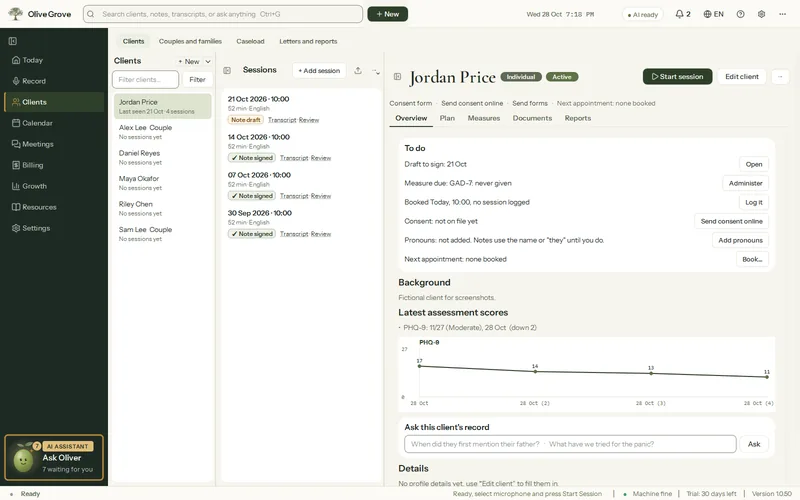
Clients and records
A complete, careful record for every client: the plan, the measures, the consent and the end of care, in one file.
- Client file. Overview, plan, measures, documents and reports in one place, with a To do list.
- Care record. Consent given, refused or withdrawn and how, referrals and consultations, information shared, incidents and reports, each dated. Changing an entry keeps the earlier version.
- Consent, revisited. The client’s To do says when consent is due for review, every 12 months unless you change it, and shows a withdrawal or a refusal.
- End care. A short form records why care ended, how the client was, the outcomes and the referrals you recommended. Their file stays.
- Treatment plan. Goals with strategies tagged by approach. The AI drafts goals only when you press Suggest goals.
- Measures. 13 instruments scored as you go, with trends over time and safety flags.
- Reports and letters. Seven kinds, drafted from what is documented, with gaps marked [NOT DOCUMENTED].
- Caseload board. Clients in four columns, Intake, Active, On hold and Discharged, with the next 14 days below. Drag a card to change its status.
- Practice file. A made-up client with sessions, notes, a plan and questionnaires, to explore every part of the app on day one. Never billed, and removed with one press.
All 33 features in this part
- Client file
- One file per person with a header (type, caseload status, consent, next appointment), sessions, Overview, Plan, Measures, Documents and Reports. Clicking a session opens its Session tab (note and transcript), which comes first.
- Client list
- All open client files with type, caseload status, last seen and next appointment, with a filter to sort, show by type, group couples and families, or show archived files.
- New client
- Create a client file from a short form, with a warning if the name already exists.
- Client details
- Edit name, code, pronouns, date of birth, contact details, address, referral source, caseload status, client type, consent and background notes.
- Client consent form
- A one-page plain-language consent form covering recording, AI-drafted notes on your computer, voice signatures, record keeping, withdrawal and confidentiality, with your practice and name filled in, in any app language. Export PDF, Copy text or Print; one press records "Consent given" with the date.
- Care record
- Consent given, refused or withdrawn and how, referrals and consultations, information shared, incidents and reports, and the ending of care, each dated in the client's file. Changing an entry keeps the earlier version, and the full record carries it all.
- End care
- When care ends, a short form records why, how the client was, the outcomes, the referrals and follow-up you recommended, and whether you discussed it with them. Saving it moves the client to Discharged; their file stays.
- Practice file
- A made-up client with three past sessions and their notes, a treatment plan, questionnaires taken twice, a consent and a booking next week, to open every part of the app before any real client is on it.
- Overview and To do
- The client's Overview: what needs doing (drafts to sign, measures due, safety flags, unlogged bookings, next booking), latest scores with a trend chart, background, goals and recent sessions.
- Ask this client's record
- Type a question and get a short answer from this client's own record, with dates and quotes.
- Treatment plan
- Goals with priority, target date and status, each with strategies tagged by modality, and an AI option to draft goals you can accept or untick.
- Conceptualization tab
- The client's formulation, editable by hand, with copy, a full rebuild from all sessions, and a version history you can restore from.
- Playbook tab
- Ranked interventions for this client by approach, each with why it fits, steps, wording, cautions and evidence. Pin, hide or annotate cards; every rebuild is kept as a version.
- Give a measure
- Pick an instrument and fill it in item by item; the score and severity update as you go. Or enter a score from a form completed elsewhere.
- Measure results and trends
- Every result newest first with its severity, the item answers, and a chart of the instrument's scores over time.
- Measures due
- Says which measures are due again on a set rhythm and offers to give them, on the file, on Today, in the brief, in the bell and before the appointment.
- Risk flag safety review
- When a saved measure raises a safety flag, a window shows the flag, a safety plan outline and your crisis resources, and asks you to confirm the action you took.
- Client documents
- Attach referral letters, intake forms or reports to a client. The text is pulled out, can be edited, and can be included in what the AI reads.
- Reports and letters
- Generate one of seven letters or reports from what is documented. You say who it is for and choose the sessions first; it is written a section at a time, checked, and saved as a draft to edit, copy or export.
- Before a report is written
- One screen before any report or letter: who it is for and why, the sessions to use, whether third parties are relevant, the gaps only you can fill, draft notes, consent to release, and your signature details.
- What a report says, and does not
- Each section has its own scope: intake from the first sessions, current from the latest, progress as a dated list. No sentence appears twice, a cut section is continued, and every report ends with Recommendations, limitations and your signature.
- Check before saving a report
- Before a report is saved, a screen lists what the checks found: wording the notes and transcript do not use (remove the sentence, or keep it), sources that disagree (to confirm), and what was removed automatically.
- Saved reports
- Each saved report shows its date, type, who it is for, how many sessions it was built from and whether it is signed. Click one to open it, highlighted; Open, Copy (with formatting or plain), Export (Word or PDF), Rename, Sign and Delete.
- Letters and reports page
- Three steps (choose a client, choose a letter or report, write the draft), with recent letters below and a library of every report and client document.
- Export a note, transcript or session
- Save a note, a transcript, or a whole session (note, review, your notes and transcript) as PDF or Word with a record header.
- Password-protected PDF
- Export a report, note or session as a PDF that asks for a password before it opens, for sending it by email or on a drive. You choose the password, or ask the app to suggest one.
- Export full record
- The whole record in date order (identification, consent, conceptualization, plan, measures, every note) as one PDF or Word document, with reviews and transcripts optional.
- Client review and supervision pack
- A one-page client review for a plan review, and a supervision pack with the formulation, plan, approach, recent sessions and your questions, with names replaced.
- Archive, merge or delete a client
- Archive a file to hide it from lists without deleting anything, merge a duplicate file into this one, or delete a client permanently.
- Caseload board
- Clients in four columns (Intake, Active, On hold, Discharged) with a 14-day agenda below. Drag a card to change its status.
- Search as you type
- Results appear under the header search while you type: pages and actions, clients, matches in notes and transcripts, related subjects, Help answers, and a question to Consult.
- Delete a session
- Permanently delete a session with its transcript, note, review and audio. From a partner's chart it only removes the joint session from that chart.
- Add past sessions
- Bring in notes from before Olive Grove. They are split into dated sessions in a table you check, then written up one at a time in the background.