
 Features: 19 in this area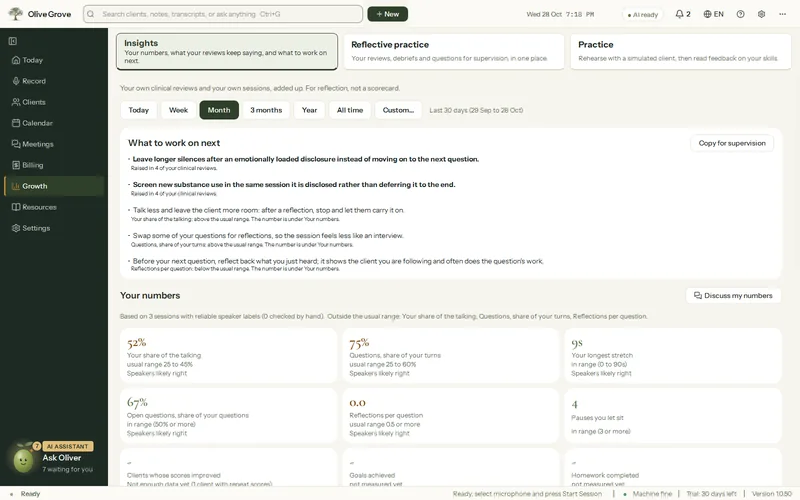
Growth and Insights
Feedback on your own work between supervision hours, drawn from your own sessions.
- Insights. Eleven numbers against healthy ranges, your strengths and what to work on next, with the evidence.
- Consult. A colleague to talk things through with from any page, answering from your own records with a link to each source.
- Rehearse with a client. Consult plays a client from their file; type “pause” for frank feedback.
- Practice. Thirty fictional cases by voice or typing, ending with scored feedback. With an NVIDIA graphics card, the client’s voice can sigh, hesitate and cry; other computers use the standard voices automatically.
- Copy for supervision. A summary of what to work on next, to take to your supervisor.
All 19 features in this part
- Insights
- Your practice for a chosen period: eleven numbers with healthy ranges, strengths and areas to grow with evidence, what to work on next, sessions held, and active risk flags.
- Reflective practice
- One place for your latest session reviews and their growth themes, recent debriefs, what to work on next, Consult, and your questions for supervision. Prepare for supervision drafts an agenda on this computer, with client names replaced.
- Insights and Practice tabs
- Growth opens on two large tabs, Insights and Practice, each with a line saying what it is for, so either is one press away.
- Your numbers
- Talk share, questions, longest stretch, open questions, reflections per question, pauses, clients whose scores improved, goals achieved, homework completed, session check score and sessions with a note, each against a healthy range; the speaker-based ones say how far their speakers can be believed.
- Strengths and where to grow
- Pattern cards from your sessions and recurring themes from your clinical reviews, each with its evidence and one next step for growth areas.
- What to work on next
- A short list of next steps from your reviews' recurring growth themes and any number outside its usual range, with a summary to copy for supervision.
- Discuss my numbers
- Opens Consult and asks it to walk you through your numbers and what to work on, using moments from your own sessions.
- Talk with Oliver
- Talk Consult's questions through by voice: hold Space or Talk (or turn on Hands-free) and Oliver answers aloud with the same sources, feedback style and actions as Consult. Talking over him stops him at once, and both sides' words are shown as text.
- Consult
- A colleague to talk things through with from any page. It answers from your notes, reviews, transcripts, goals, numbers, calendar, billing and Help, with a numbered link to each source.
- Consult actions and Pin to chart
- An answer can offer an action (open a page or client, book a time, draft an email, start a tool) done only after "Do it", and "Pin to chart" puts one message into the client's chart.
- Practise with the client in Consult
- Consult plays a client from their file so you can rehearse a hard conversation; type "pause" for frank feedback.
- Practice
- Rehearse a session with a simulated client by voice or typing, with live suggestions running as in a real session, ending with scored feedback.
- Practice cases
- Three ways in, side by side: from a client file (recommended, a character built from the client's formulation, chosen in place), a practice case (thirty fictional cases to search and filter by approach and difficulty, shown below only when chosen), or your own topic.
- Practice voices
- The client speaks in a voice you choose from a list, each with its own Preview: six standard English voices for any computer (American and British, female and male), or a Windows voice for the practice language; Speed sets how fast the client talks.
- Talking over the practice client
- Choose whether the client finishes the sentence when you speak, keeping what you say or type for after, or lets you interrupt. Noise, typing and the client's own voice from the speakers never stop it. Sensitivity has a Test button and a meter.
- Answering naturally in practice
- The client answers when you pause, after about 1.2 seconds, and never mid-sentence: only your voice counts as speech, not a fan, typing or the client's echo. A state shows Listening, You're speaking, Thinking or Client speaking, with the microphone level.
- Natural practice voices
- Five more lifelike voices that can sigh, hesitate and cry when the client does, chosen by default to match each character. They need an NVIDIA graphics card; other computers use the standard voices automatically.
- Practice feedback
- Ends the practice with scores for empathy, reflections, questions, summaries and approach fidelity, counts from your own words, risk steps for risk cases, and one line to try next time.
- Practice history
- Past practices with date, case, length and score, a chart of recent scores, and each feedback reopened by double-click.