
Reflective practice and preparing for supervision
Checked against the app on 24 October 2026
Reflective practice gathers your latest session reviews and their growth themes, recent Consult debriefs, what to work on next and your questions for supervision. Prepare for supervision drafts an agenda on this computer, with client names replaced. It is a reflective aid: it is not clinical supervision and does not replace your supervisor.
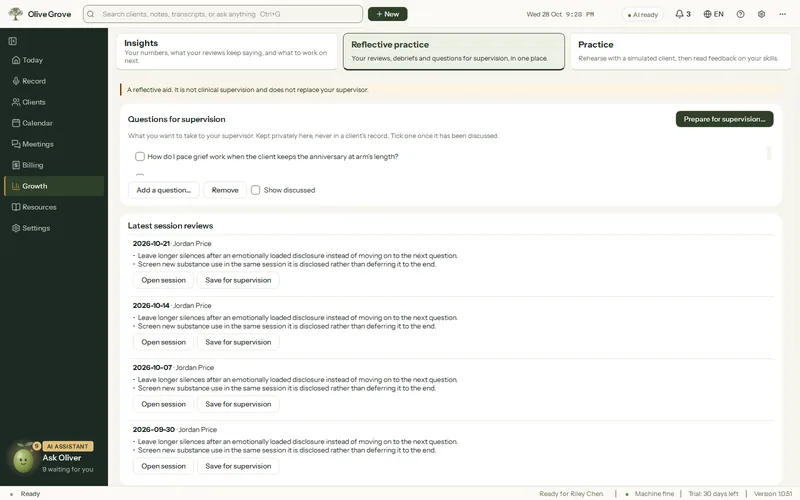
Where: Growth > Reflective practice
Keep your questions for supervision
- On Reflective practice, press Add a question… to write one down.
- Or press Save for supervision on a session’s Review tab, on a review card, or under any Consult answer.
- Tick a question once it has been discussed. Show discussed brings the ticked ones back.
Draft the agenda
Step 1: Press Prepare for supervision…, tick the questions to bring and pick the clients to discuss.
Step 2: Press Draft the agenda. The AI on this computer writes it from your questions, recent growth themes and open risk flags. The clients you picked become “Client A”, “Client B”; any other client is “another client”.
Step 3: Copy it, Add to a Supervision pack…, or Attach to a supervision meeting…. In the meeting, the agenda opens beside the record so you can tick what was discussed.
What it will not do
- It never approves, signs off or speaks as a supervisor. Any such sentence is removed from what the AI writes.
- When a risk flag is open, it does not reassure. It shows “Talk to your supervisor or a trusted colleague now” first.
- Questions and agendas are kept privately, like Consult conversations, and never go into a client’s record.
Was this article helpful?
Related articles
Still need help?
Write to us. We read every message and reply within one business day.