
 Features: 21 in this area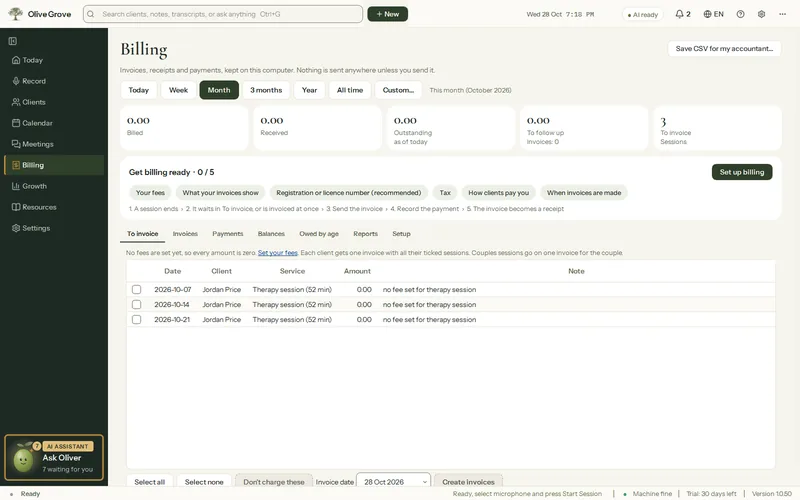
Billing
Invoices, receipts and statements on your own computer, down to one receipt per client at the end of the year. The app takes no payments and sends nothing itself.
- To invoice. Sessions and charged missed appointments, ready to become one invoice per client.
- Invoices. Numbered PDFs with your logo, registration number, taxes and how to pay.
- Payments and receipts. Record e-transfer, card, cash, cheque or insurance payments; each gets a numbered receipt.
- Year receipts. One PDF per client for everything they paid in the year, for insurance or a tax return, all saved together.
- Credit notes and void. An issued invoice is locked; lower it with a credit note, with every change in its history.
- Taxes and currency. Up to two taxes, an exemption statement in your own words, and any currency.
- For your accountant. A CSV of every invoice and payment. Billing can be turned off if a clinic bills for you.
All 21 features in this part
- Billing page
- Pick a period and see billed, received, outstanding, to follow up and to invoice, with tabs for To invoice, Invoices, Payments, Balances and Reports.
- Set up billing
- A step-by-step guide to fees, what invoices show, tax, how clients pay and when invoices are made, saving as you go.
- Fees and services
- A fee for each service, an optional billing code and a Taxable tick, plus a client's own fee, a sliding scale reduction and someone else to bill.
- To invoice
- Every session and charged missed appointment not yet invoiced, ticked and ready; change an amount, leave some uncharged, then create one invoice per client.
- Invoices
- Numbered invoices saved as PDF with your logo, practice details, registration number, service dates, taxes, payments and how to pay, with filters and search.
- Email an invoice
- Saves the PDF, opens your email program with the message written, and opens the folder so you can attach the PDF.
- Saved charges
- Anything you charge for besides sessions (an extended session, a letter, a report, a group) saved once with its price and tax, then picked when adding a charge.
- Locked invoices, credit notes and void
- Once saved as PDF, emailed, paid or credited, an invoice is locked; lower it with a numbered credit note, or void it if nothing has been paid. Every change stays in its history.
- Refunds and client credit
- Give money back on an invoice with a numbered refund, or use a client's credit (an overpayment or a credit note on a paid invoice) to pay another of their invoices. Money received in reports is net of refunds.
- Write off a balance
- Close what a client will not pay with a reason. The invoice shows as Written off, the amount leaves what is owed and is never counted as money received, and it can be undone.
- Owed by age
- What each client owes, grouped by days past the due date: 0-30, 31-60, 61-90 and over 90, with totals. Open the client or any unpaid invoice from the list, or save it as a CSV.
- One payment for several invoices
- Record one amount from a client and let it pay their open invoices oldest first. You see the split before saving; each invoice gets its own payment and receipt, linked by one reference.
- Online payments
- Clients pay your invoices by card on a secure Stripe page, all of what is due or part of it, straight into your own Stripe account. Each payment is recorded on its invoice by itself, and a paid invoice becomes a receipt.
- Payments and receipts
- Record money received against an invoice with date, method and reference; each payment gets a numbered receipt, and a fully paid invoice prints as a receipt.
- Balances, invoices to follow up and statements
- Who owes what and how much is to follow up, with a PDF statement for any client listing services, taxes, credits and payments in the period.
- Year receipts
- One receipt per client for everything they paid in a calendar year, for insurance or a tax return: each payment with its receipt number and the services it covered, and the total, under your practice header.
- Billing reports and CSV
- Billed, received and still to invoice for the period, received by month and method, billed by service, and a CSV of every invoice and payment for your accountant.
- Taxes and currency
- Up to two taxes by name and rate on services ticked Taxable, added on top or included in your fees, an exemption statement in your own words, and any currency.
- Insurance details on invoices
- Your registration number, a supervisor if you have one, service codes, and optionally a client's diagnosis code, printed for insurance claims.
- Payment terms and invoice text
- Days until payment is due, how clients pay, the methods you accept, a note at the bottom of invoices and the paper size.
- Turn Billing off
- Hide Billing entirely if a clinic or agency bills for you. Nothing is deleted, and turning it back on restores everything.