
The activity log and the privacy pack
Checked against the app on 24 October 2026
The activity log records sign-ins, locks, files opened, notes signed and amended, exports, deletions, backups and changes to AI settings, kept 10 years. The privacy pack writes a privacy impact assessment, a client information sheet and a security summary for you.
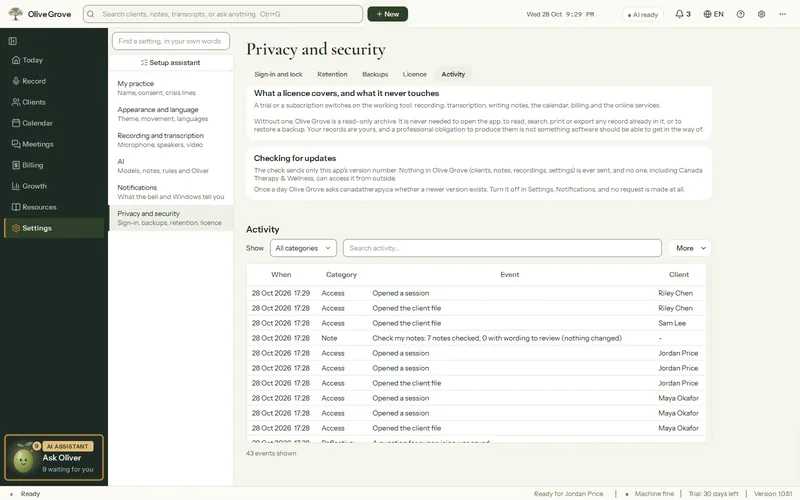
Where: Settings > Privacy and security > Activity; Sign-in and lock > Privacy pack
The activity log
Step 1: Open Settings > Privacy and security > Activity.
Step 2: Use Search activity… to find entries by words, a client or a kind of action. The newest 500 matching entries are shown.
Clearing older history needs a reason, and audit entries are kept 10 years.
The privacy pack
Step 1: Open Settings > Privacy and security > Sign-in and lock > Privacy pack and press Write the privacy pack….
Step 2: Three Word documents are written, filled in from how this computer is set up: a privacy impact assessment, an information and consent sheet for clients, and a one-page security summary.
Step 3: Fill in anything marked [to complete] and keep them with your practice records.
Was this article helpful?
Related articles
Still need help?
Write to us. We read every message and reply within one business day.