
Cloud backup with your recovery code
Checked against the app on 24 October 2026
Once a day, an encrypted copy of your practice is sealed on your computer with your recovery code and kept online. Only your recovery code opens it: nobody else can, us included. Restore it on the same computer or a new one.
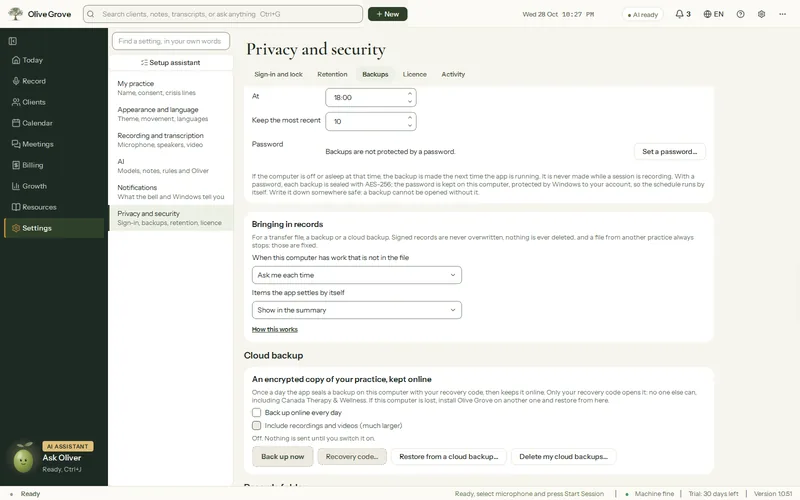
Where: Settings > Privacy and security > Backups > Cloud backup
Step 1: Open Settings > Privacy and security > Backups > Cloud backup and tick Back up online every day.
Step 2: Write down your Recovery code… and keep it somewhere safe, away from the computer.
Step 3: Choose whether to include recordings. They are left out unless you tick them.
Step 4: Press Back up now to make the first one.
- The newest 10 backups are kept.
- To restore, choose Restore from a cloud backup…, on this computer or after installing Olive Grove on a new one, and type the recovery code.
- Delete my cloud backups… removes them from the service.
- It needs a subscription, and is off until you switch it on.
Was this article helpful?
Related articles
Still need help?
Write to us. We read every message and reply within one business day.