
Keep, clean up and delete records
Checked against the app on 24 October 2026
Choose how long files are kept, delete recordings a set number of days after the note is signed, free up space, and lock a client or session against any cleanup. Deleting a file is always your decision; the app never does it on its own.
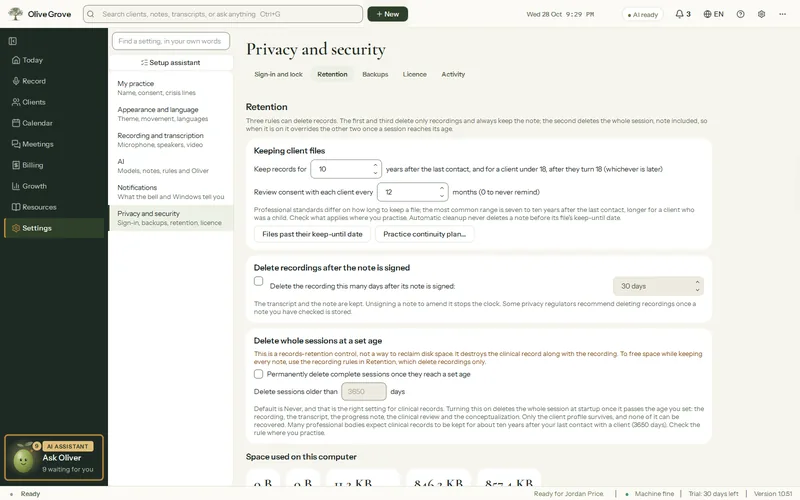
Where: Settings > Privacy and security > Retention
| Setting | What it does |
|---|---|
| Keep records for | Years a file is kept after the last contact, and after a young client turns 18. Each file shows its keep-until date; automatic cleanup never deletes a note before it. Ten years unless you change it. |
| Delete the recording after signing | Deletes a session’s audio and video 1 to 365 days after its note is signed; the transcript and note are kept. On (30 days) for a new installation. |
| Free up space now | Shows the space used by audio, video, notes and the database, and deletes old recordings. |
| Choose what to delete… | Each client and session with what its audio, video and transcript weigh. Tick what to remove and confirm. Notes are never deletable here. |
| Keep | Locks a client or session against every cleanup, yours and the automatic ones. Shown as “Kept”. |
| Files past their keep-until date | A list for you to review. Nothing is deleted on its own. |
Practice continuity plan
Practice continuity plan… names the person who would contact your clients and look after the records if you could not, how to reach them, where the records and backups are, and what you would like done. Export the plan makes a document for them. It lists your active clients’ names and contact details, so keep it as securely as the records.
Was this article helpful?
Related articles
Still need help?
Write to us. We read every message and reply within one business day.