
Let clients pay invoices online
Checked against the app on 24 October 2026
Clients pay your invoices by card on a secure Stripe page, straight into your own Stripe account. Each payment is recorded on its invoice by itself, and a paid invoice becomes a receipt. You pay Stripe’s own fees; Olive Grove takes none.
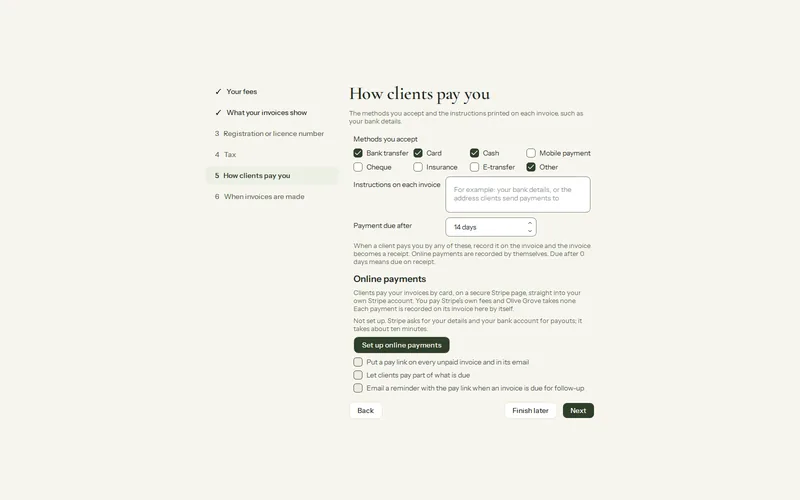
Where: Billing > Set up billing… > How clients pay you > Online payments
Set it up once
Step 1: Open Billing, press Set up billing… and go to How clients pay you.
Step 2: Under Online payments, press Set up online payments. Stripe’s own sign up opens in your browser.
Step 3: Give Stripe your details and the bank account it pays you into. It takes about ten minutes. Stripe then checks your details, usually within minutes.
Step 4: Back in Olive Grove, press Check again. When it says Ready, clients can pay your invoices online.
Every invoice after that
- An unpaid invoice carries a Pay online link, printed on the PDF and put in the email from Email to the client….
- Copy the pay link in an open invoice copies it, to send any other way.
- With Let clients pay part of what is due ticked, the client may pay any amount up to what is due; the link then asks for what is left.
- A few minutes after a payment, while Olive Grove is open, it is recorded on the invoice as Card, with “Paid online” and Stripe’s reference, and you see a notice.
- With Email a reminder with the pay link when an invoice is overdue ticked, a client whose invoice is overdue gets a short reminder from your practice the day after the due date, then every 7 days, at most 3 times. Replies come to you.
Card details go to Stripe only. For each pay link, Olive Grove’s service keeps the invoice number, the amount, the currency, your practice’s name and, if the client’s file has one, their email, so Stripe can fill it in. Nothing about the sessions.
Was this article helpful?
Related articles
Still need help?
Write to us. We read every message and reply within one business day.