
Client files: create, edit and find clients
Checked against the app on 24 October 2026
One file per person holds the sessions, an Overview with what needs doing, the Plan, Measures, Documents and Reports. Create a client with Ctrl+N; only the name is required.
Where: Clients (Ctrl+3)
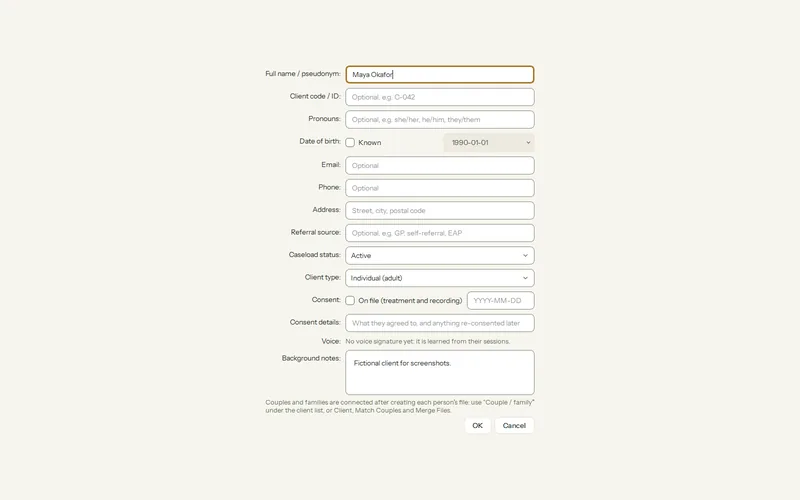
Step 1: Press New client (Ctrl+N), or Clients > + New > New client…. Type the name; you are warned if it already exists.
Step 2: Press Edit client to add a code, pronouns, date of birth, contact details, address, referral source, caseload status, client type and background notes.
Step 3: Add the client’s email address if you will send reminders, booking emails or invoices.
| Tab | What is there |
|---|---|
| Session | The note and transcript of the session you clicked. |
| Overview | To do (drafts to sign, measures due, safety flags, unlogged bookings), latest scores with a trend chart, background, goals and recent sessions. Ask this client’s record answers a question with dates and quotes. |
| Plan | Treatment plan, conceptualization and playbook. See Treatment plans. |
| Measures | Questionnaires given, scores and trends. See Give a questionnaire. |
| Documents | Referral letters, intake forms or reports you attach (PDF, DOCX, TXT, MD, CSV). Their text can be included in what the AI reads. |
| Reports | Letters and reports written for this client. |
Find a client
- The client list shows type, status, last seen and next appointment. Filter sorts, shows by type, groups couples and families, or shows archived files.
- Caseload shows clients in four columns: Intake, Active, On hold and Discharged. Drag a card to change its status; each move can be undone for 10 seconds.
- The header search finds clients, and words in notes and transcripts, as you type.
Was this article helpful?
Related articles
Still need help?
Write to us. We read every message and reply within one business day.