
Who owes what: owed by age, write-offs, one payment for several invoices
Checked against the app on 24 October 2026
Owed by age shows each client’s unpaid balances grouped by how long they are past due. Write off a balance you will not collect, without counting it as money received, and undo it if you need to. When a client pays several invoices at once, record one payment and Olive Grove spreads it over the oldest first.
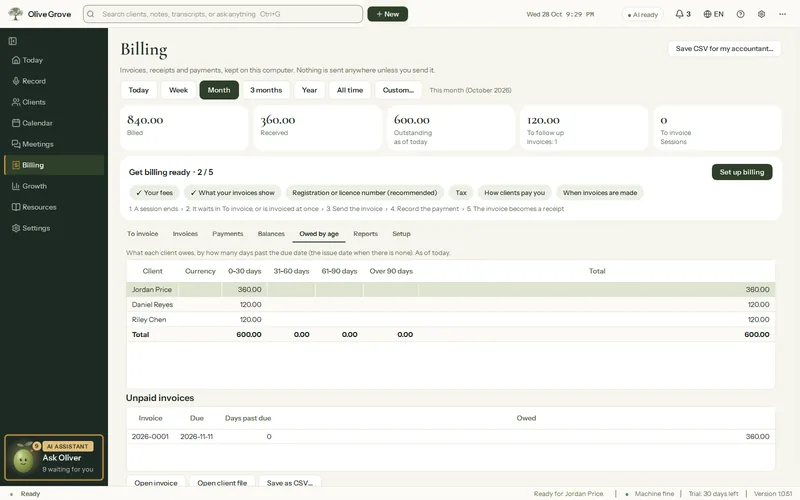
Where: Billing > Owed by age
Owed by age
- Open Billing > Owed by age. Each client’s unpaid balance is split into 0-30 days, 31-60 days, 61-90 days and Over 90 days past the due date (the issue date when there is none); invoices not yet due count in 0-30.
- Totals are per currency and match Outstanding. Select a client to see their unpaid invoices with Days past due, then Open invoice or Open client file.
- Save as CSV… saves the table for your accountant.
Write off a balance
Step 1: Open the invoice and choose Write off the balance….
Step 2: Give a reason and confirm. The balance is no longer counted as owed, and it is not counted as money received. The invoice shows Written off and is locked.
Step 3: Changed your mind? Undo the write-off puts the balance back. If the client pays later, the payment undoes the write-off by itself and is recorded as usual.
One payment for several invoices
Step 1: In Billing > Balances choose One payment for several invoices…, or in Record a payment… choose Pay several invoices with one payment….
Step 2: Enter the amount. Olive Grove shows how it is split, oldest invoice first, and what is still owed after it. It cannot be more than the client owes.
Step 3: Press Record the payment: each invoice gets its own payment and receipt, linked by one reference.
Was this article helpful?
Related articles
Still need help?
Write to us. We read every message and reply within one business day.