
Card on file and missed-appointment fees
Checked against the app on 24 October 2026
Ask clients who book online to save a card that holds their booking. Nothing is charged when they book. If a client misses the appointment or cancels too late, you can charge the fee you set for that service to the saved card, after you confirm it, and it is filed in Billing by itself.
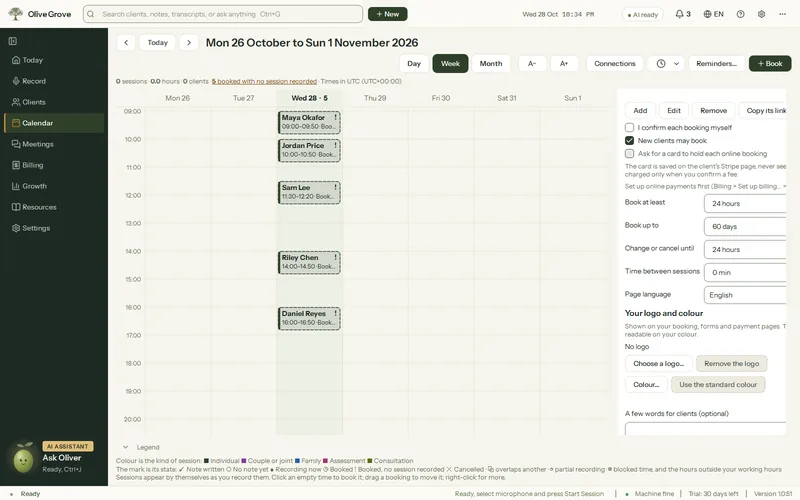
Where: Calendar > Connections > Online booking
Set it up
Step 1: Set up online payments first: the card is saved in your own Stripe account.
Step 2: Open Calendar > Connections > Online booking and tick Ask for a card to hold each online booking.
Step 3: Add or edit each service that has fees and fill in No-show fee and Late cancellation fee (leave No fee where there is none).
Step 4: Say what the fees are in your cancellation policy: clients accept it when they book, and the booking page lists the fees beside the card step.
Step 5: Press Update my page.
What clients see
- After choosing a time and giving their details, the client presses Continue to add a card and saves a card on Stripe’s secure page. Nothing is charged.
- Until the card is saved the time is held, but the booking is not in your calendar and nobody is emailed. Once it is saved, the booking is confirmed (or sent to you as a request) as usual.
- A booking whose card is not saved within 30 minutes is released, and the time is open again.
Charge a fee
Step 1: In Calendar, right-click the online booking and choose Charge the no-show fee… (once its time has passed) or Charge the late cancellation fee… (when it was cancelled late).
Step 2: Check the client, the appointment, the card (for example “Visa ending 4242”) and the amount, which you can change. Add a note for the client if you wish.
Step 3: Press Charge the card. The client is emailed a short notice of the charge, and Billing gets an invoice for the fee, paid by card.
Stripe keeps the card in your account. Olive Grove’s service keeps only Stripe’s references, the card’s brand and its last four digits.
Was this article helpful?
Related articles
Still need help?
Write to us. We read every message and reply within one business day.