
Notifications and the bell
Checked against the app on 24 October 2026
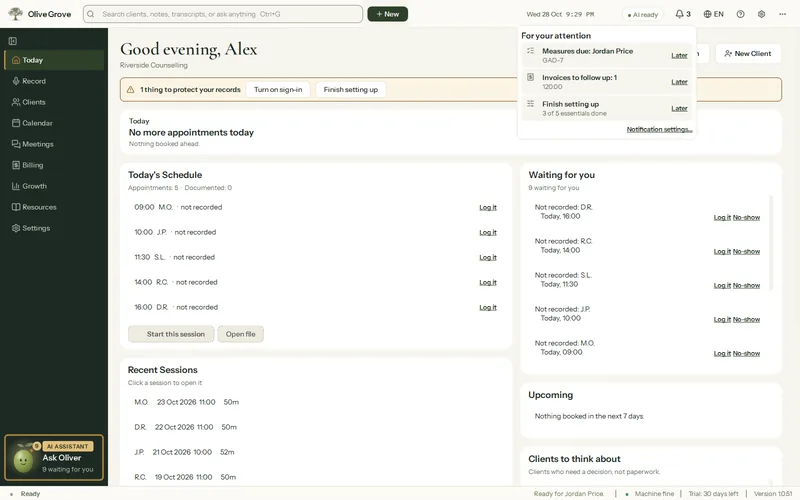
The bell in the header lists what needs you. Windows notifications arrive before each appointment, each morning, at the end of the day and weekly, with clients’ initials rather than names unless you choose.
Where: Header > bell; Settings > Notifications
The bell
It lists today’s appointments, notes to write and sign, measures due, overdue invoices, sessions to invoice, setup, subscription and updates (up to 12 items). Later hides an item until 06:00 the next day. A failed or missing backup shows at the top of Today instead.
Desktop notifications
Step 1: Open Settings > Notifications and tick Show desktop notifications.
Step 2: Choose each kind: before each appointment (10 minutes by default, 1 to 120), the morning summary (08:00), the end of day (17:00), and weekly for unsigned notes, overdue invoices, an old backup and unfinished setup.
Step 3: Press Send a test notification to check they appear.
Step 4: Tick Start when I sign in to Windows so notifications arrive without opening the window.
Was this article helpful?
Related articles
Still need help?
Write to us. We read every message and reply within one business day.