
Secure messages from clients
Checked against the app on 24 October 2026
Clients can write to you from their own appointments page. The message is sealed in their browser so only your computer can open it; Olive Grove files it in the client’s documents, marks it unread and tells you. You are emailed that a message is waiting, never what it says.
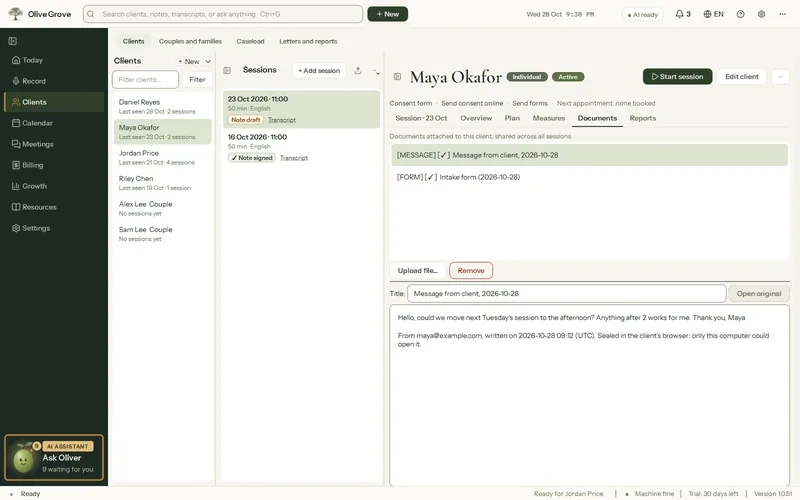
Where: Client > Documents > Message from client
How it works
- It works when online booking or client forms are on: Olive Grove publishes the key that seals the messages.
- A client opens their page from Already booked? on your booking page and uses Write to your practice.
- Every few minutes while Olive Grove is open, new messages are opened on your computer and filed as Message from client and the date in that client’s documents (a new client file is made from the email when none matches). A notice appears, and the Client forms panel lists New message from.
- Once filed, the sealed copy on the service is emptied.
Reply
Open the message and press Reply by email…: your own email program opens, addressed to the client. A reply is ordinary email, not sealed like the client’s message, so keep clinical detail for the session.
Was this article helpful?
Related articles
Still need help?
Write to us. We read every message and reply within one business day.