
System requirements
Checked against the app on 24 October 2026
Olive Grove runs on Windows 10 or 11, 64-bit. It works on any recent computer; more memory gives a stronger notes model, and a graphics card makes notes and transcripts faster.
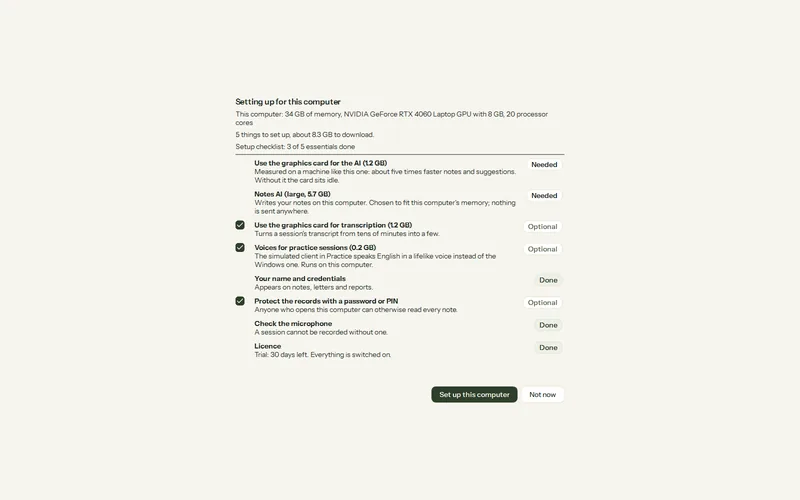
| Part | What it needs |
|---|---|
| Windows | Windows 10 or 11, 64-bit. |
| Memory | 8 GB or more is recommended. Under 8 GB the smallest model is used and notes may be slow or fail. |
| Disk space | Room for the models, downloaded after installation (about 1.3 to 5.7 GB for the notes model). Set up this computer warns when free space is below the downloads plus 5 GB. |
| Graphics card | Optional. An NVIDIA, AMD Radeon or Intel Arc card makes notes and live cues much faster; an NVIDIA card also speeds up transcription. |
| Microphone | Any microphone Windows can see. For online sessions, the call audio is recorded from the computer itself. |
| Internet | For the first downloads, activation and updates. Sessions, transcripts and notes then work offline. |
Which notes model your computer gets
The choice depends on memory, not on the graphics card. You can measure or change it later in Settings > AI > Model library.
| Memory Windows reports | Notes model | Download |
|---|---|---|
| Under 8 GB | Qwen 3.5 2B, with a warning | 1.3 GB |
| 8 GB to under 20 GB | Qwen 3.5 4B | 2.7 GB |
| 20 GB or more | Qwen 3.5 9B | 5.7 GB |
Was this article helpful?
Related articles
Still need help?
Write to us. We read every message and reply within one business day.