
Supervisor co-signature
Checked against the app on 24 October 2026
If you work under supervision, you can choose to have signed notes wait for your supervisor’s co-signature. They co-sign at your computer with their own PIN or password, or return the note with comments; or you send them a password-protected PDF and record their reply. The AI never co-signs.
Where: Settings > My practice > Profile; a session > Co-signature
Turn it on
Step 1: Open Settings > My practice > Profile and fill in Supervisor (optional) with your supervisor’s name and credentials.
Step 2: Tick Notes need a supervisor’s co-signature. Only notes signed from that day on wait; earlier notes are left as they are.
Step 3: Hand the keyboard to your supervisor and let them press Supervisor’s PIN or password… to set their own. Only a scrambled copy is kept; changing it later needs the old one.
Co-sign at your computer
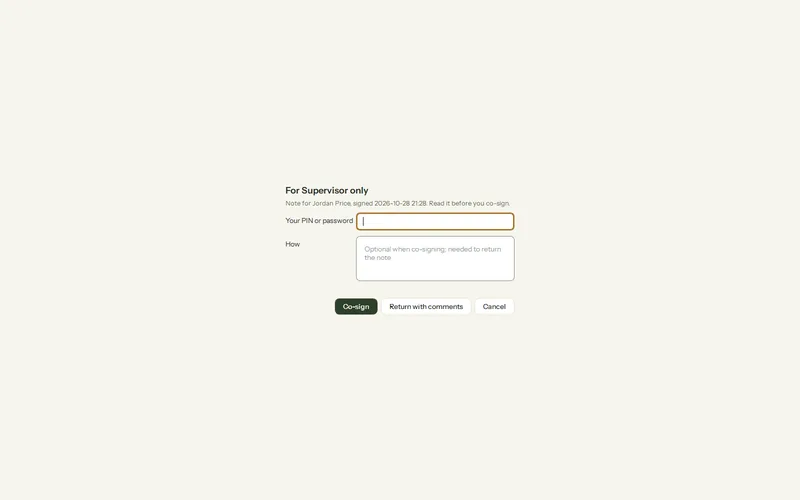
Step 1: Open the signed note and press Co-signature > Co-sign as supervisor…. The dialog says who it is for, so the supervisor knows they are signing as themselves.
Step 2: The supervisor enters their PIN or password, adds a comment if they like, and presses Co-sign. “Co-signed by” their name and the date appears under the note and in its PDF and exports.
Step 3: Or they press Return with comments and write what should change. The note unlocks for you, the signed text is kept under Versions, and their comments show under the note.
When your supervisor reviews elsewhere
- Send for co-signature… makes a password-protected PDF of this note, or of every note waiting. Send it yourself and give the password another way.
- When they reply, Record a co-signature… takes their name, credentials, the date and any comment. It is marked as recorded by you after a review elsewhere, not signed on this computer.
What is waiting
Notes waiting for co-signature are listed under Co-signature > Waiting for co-signature, in the client file’s to-do list and on Today. Unlocking a co-signed note to amend it voids the co-signature; the co-signed text stays under Versions and the change is in the activity log.
Was this article helpful?
Related articles
Still need help?
Write to us. We read every message and reply within one business day.