
A session was interrupted or left running
Checked against the app on 24 October 2026
The transcript and quick note are saved every 20 seconds. If the computer slept, crashed or lost power, the session is offered for recovery at the next start and written up then. A session left running ends itself after a quiet spell unless you keep recording.
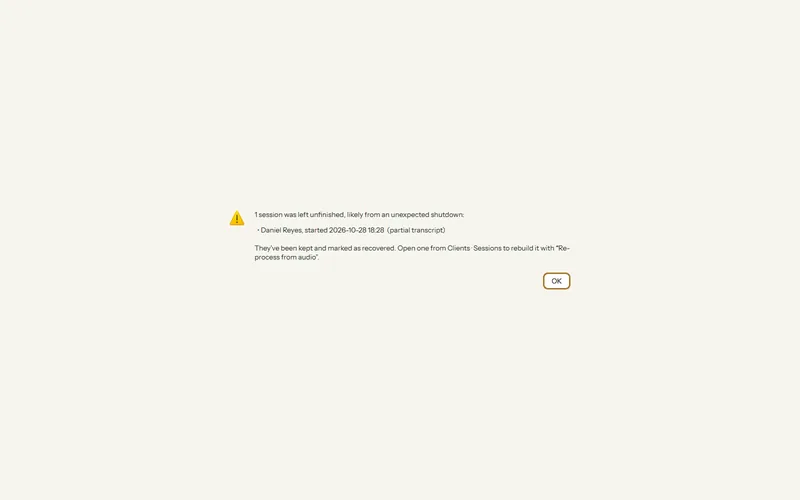
After a crash or a power cut
Step 1: Open Olive Grove again. A Recover interrupted session message appears.
Step 2: Accept it. The session is transcribed and written up from what was saved, and the footer shows the progress.
Step 3: Read the note before you sign it, as for any session. The last few seconds before the stop may be missing.
- The laptop slept. Time the computer slept (30 seconds or more) is cut out of the recording.
- You closed the window. Olive Grove asks first: Keep recording or End session and close. Windows sign-out, shutdown or an update also end the session properly; the note is written the next time the app is open.
A session left running
When nobody has spoken for a while (15 minutes by default), a message and a desktop notification ask “Nobody has spoken for N min”. Press Keep recording, or the session ends two minutes later. It never happens before anyone has spoken or while paused. Change or turn it off in Settings > AI > After each session > End a session left running after (0 turns it off).
Write the session again from its recording
If a transcript or note came out wrong, open the session in the client’s file and choose ⋯ More > Re-process from audio (Ctrl+Shift+R). It needs the recording, and the note must not be signed.
Was this article helpful?
Related articles
Still need help?
Write to us. We read every message and reply within one business day.