
Olive Grove online: your practice in a browser or on your phone
Checked against the app on 29 October 2026
Olive Grove online opens your calendar, clients and billing in a browser or on your phone, at app.olivegrove.app/app. It is locked with your practice key: each change is locked on the device where it is made, and session notes, transcripts and recordings stay in Olive Grove on your computer.
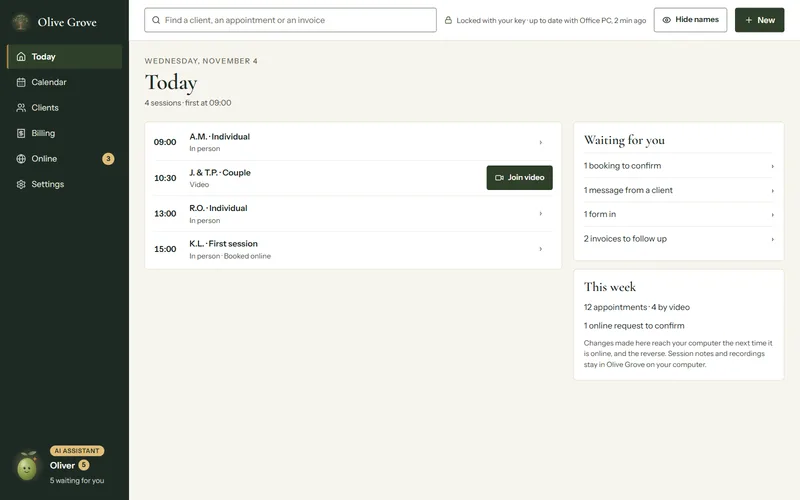
Where: app.olivegrove.app/app, or Your account > Open Olive Grove online
What it shows
- Today: your sessions, with Join video for a video session, and what is waiting for you.
- Calendar, Clients and Billing, which you can change from here; your computer gets each change the next time it is online, and the reverse.
- Online: your booking page, forms, pay links and clients’ messages.
- Settings: practice details, hours, services and fees, reminders, devices and security.
Open it
Step 1: In Olive Grove on your computer (version 1.0.54 or later), turn on Olive Grove online. Your computer makes your practice key and locks a copy with your recovery code.
Step 2: In a browser, go to app.olivegrove.app/app and sign in with your Olive Grove account.
Step 3: Approve this browser, from your computer or with your recovery code. See Approve a new device.
Step 4: Your practice opens on Today. The line at the top says it is locked with your key and when your computer was last up to date.
Put it on your phone’s home screen
- iPhone or iPad: open app.olivegrove.app/app in Safari, tap Share, then Add to Home Screen.
- Android: open it in Chrome, tap the menu, then Add to Home screen or Install app.
It then opens like an app. Only the app itself is kept on the phone for quick opening; your practice is kept locked and opens with this browser’s key.
Was this article helpful?
Related articles
Still need help?
Write to us. We read every message and reply within one business day.