
Add a session you did not record
Checked against the app on 24 October 2026
For a session you did not record, add it from your own notes (typed or dictated), import an audio or video file made elsewhere, or bring in past notes from before Olive Grove. A no-show is logged as a missed appointment.
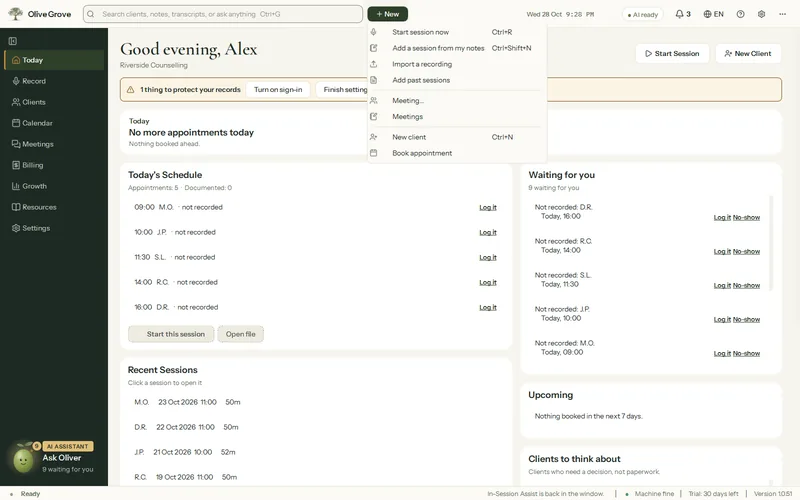
Where: Header > New
From your notes
Step 1: Press New > Add a session from my notes (Ctrl+Shift+N), or + Add session in the client’s file.
Step 2: Choose the client, who else came, the date, time, length and type.
Step 3: Type your notes, rough is fine, or press Dictate and speak. Dictation is typed on this computer; no audio is kept.
Step 4: Leave Write the session note from my notes ticked to have the note drafted in the format you choose. Nothing is added that your notes do not say.
From a recording made elsewhere
Press New > Import a recording, or drop the file on Record or a client file. A phone, Zoom or Teams recording works: mp3, m4a, wav, aac, ogg, flac, mp4, mov, m4v, webm or mkv. Your own file is never changed; a copy is written up like a recorded session.
A missed appointment
In Add a session, set Attendance to No-show or Late cancellation, or click the booking on the Calendar. It is not counted as a session, and your missed appointment fee goes to To invoice if you set one.
Was this article helpful?
Related articles
Still need help?
Write to us. We read every message and reply within one business day.